Follow the steps below to run the PKI DB Appliance services.
To run the PKI DB Appliance services
Log in to the system on which you installed the PKI DB Appliance node.
The PKI DB Appliance installer will automatically run at virtual machine start.
Enter and confirm a password for the PKI DB Appliance
htadminadministrator and press Enter.This password controls access to the PKI DB Appliance for performing some administrative tasks. It does not permit access to the full OS.
Save this password in a secure place.
If you lose the password, contact Entrust Support. For security reasons, PKI DB Appliance does not provide a user-accessible password recovery mechanism.
Review the confirmation dialog that displays the URL of the PKI DB Appliance web console.
Press Enter to finish the installation.
- Wait until the installation completes.
- Copy the Management IP Address displayed on the confirmation dialog.
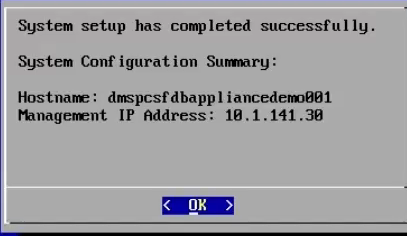
- Press Enter to close the dialog.