This overview explains how a business application, such as a banking application, interacts with the Cryptographic Security Platform Vault for Cryptographic APIs to tokenize data.
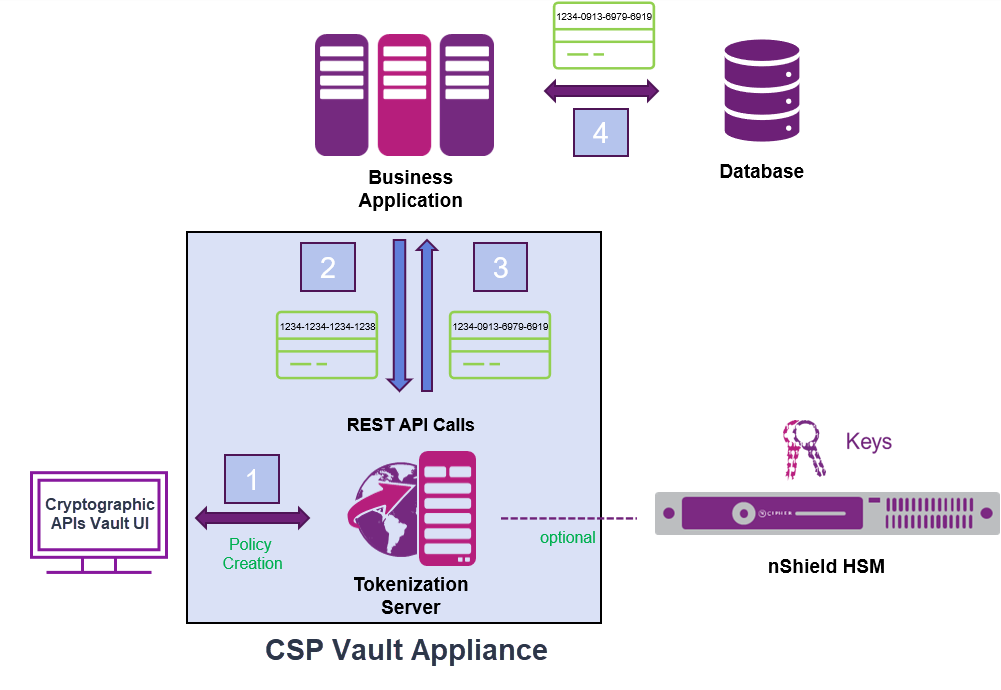
In summary:
Add the relevant user (the business application's user account) to the list of vault users. You must also add this user to the relevant access policy.
You set up the required tokenization policies.
The keys for each policy are stored on Cryptographic Security Platform Vault or, optionally, an HSM.
The business application interacts with the vault through REST API calls.
The business application sends data to the vault for tokenization using the relevant policy.
The vault tokenizes the data and returns the token to the business application.
The business application stores and uses the token as needed.
The vault does not store the original data or the tokenized data. Applications interact with the vault using REST API calls. For example, an application sends token data to the vault to be tokenized using a specific policy:
{ "policyName" :"CreditCard-1", "tokenData" : "1234-1234-1234-1238"}In this example,
- The tokenization policy is
CreditCard-1. - The data to be tokenized is
1234-1234-1234-1238.