In Linux, a disk can be either free or under Entrust control. If Entrust controls it, then it must be attached before applications can access it.
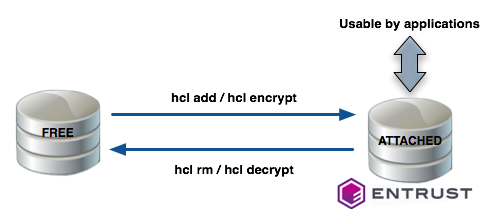
Entrust allows you to register:
- New disks with no existing data (using the
hcl addcommand). - Existing disks that already contain data you want to retain (using the
hcl encryptcommand).
After you register a disk with Cryptographic Security Platform Vault for VM Encryption and perform the initial encryption, you can rekey the disk, move the disk, or reimport the disk using the Cryptographic Security Platform Vault for VM Encryption webGUI or hicli.
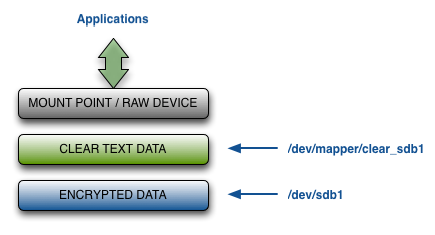
The Cryptographic Security Platform Vault for VM Encryption creates an unencrypted path to the data that is accessible when the disk is attached. The default pathname is /dev/mapper/clear_diskname (for example: /dev/mapper/clear_sdb1), but you can change that path when you register the disk.
Warning: Once you set up the encrypted disk, you should NOT access the unencrypted device through anything other than the clear text path. In other words, you always need to use /dev/mapper/clear_sdb1 instead of /dev/sdb1. The Linux kernel caches data, which it may flush periodically. If you write to the raw device without going through the /dev/mapper interface, you could end up with corrupted data.
This means that any existing entries for the unencrypted device in the Filesystem Table (/etc/fstab) need to be updated to point to the clear text version of the device. An incorrect fstab entry can result in the system hanging when it reboots. For details, see Automatically Mounting Linux Filesystems,Changing the Mount Order on Linux.
The following figure summarizes the layers at which encrypted and unencrypted data is available:
This section includes:
- Changing the Mount Order on Linux
- Automatically Mounting Linux Filesystems
- Troubleshooting the HTCrypt Driver
- Uninstalling the HTCrypt Driver
- Updating the HTCrypt Kernel Dependencies
- Configuring UEFI Secure Boot
- Viewing HTCrypt Driver Status
- Enabling Linux Online Encryption with the CSP Vault for VM Encryption webGUI
- Enabling Linux Online Encryption with the CLI
- Linux Online Encryption Prerequisites and Considerations
- Linux Encryption Prerequisites