An intermediate Certificate Authority (CA):
- Operates under the authority of a root or intermediate CA.
- Issues digital certificates for subordinate CAs or for other intermediate CAs.
See below for instructions on creating an intermediate CA.
If the root CA of the new CA is an external CA, you must have at hand the certificate issued by the external CA for the new CA.
To create an intermediate certificate authority
Open the following URL in a Web browser.
https://<hostname>/v2/Where
<hostname>is the IP address or domain name selected in General.- Log in to the Management Console as the user described in Creating partition administrators.
- Select the partition on which to manage certificate authorities and certificates.
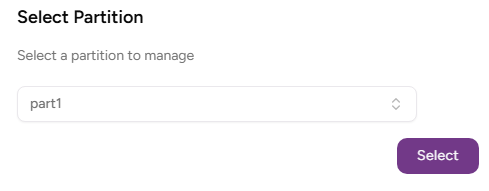
- Click Select.
Click Certificate Authorities on the sidebar.
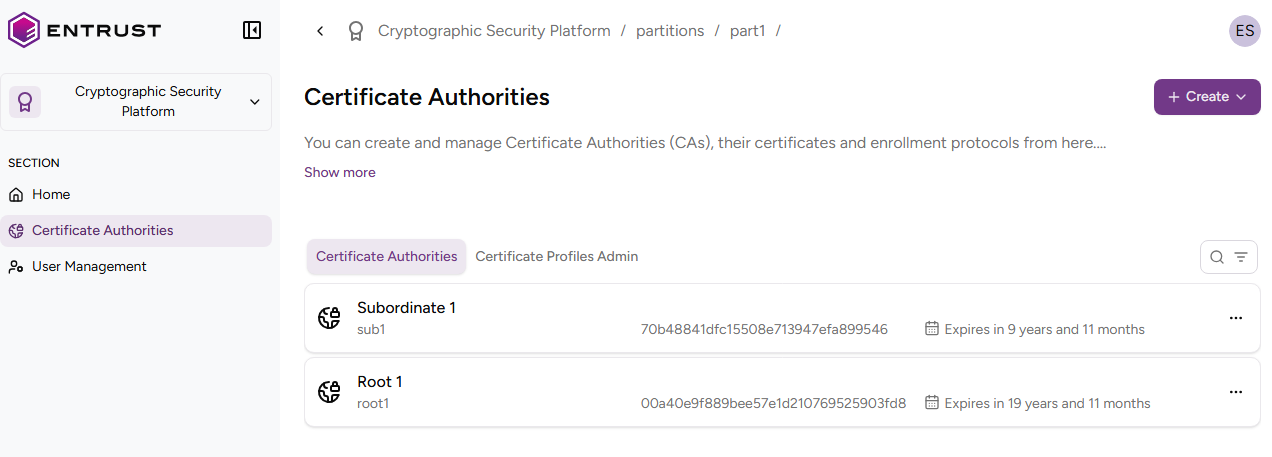
- Click Create > Certificate Authority.
- Configure the following settings.
- Click Create to create the new Certificate Authority.
If the parent CA is an external CA:
- Click Import Authority Certificate.
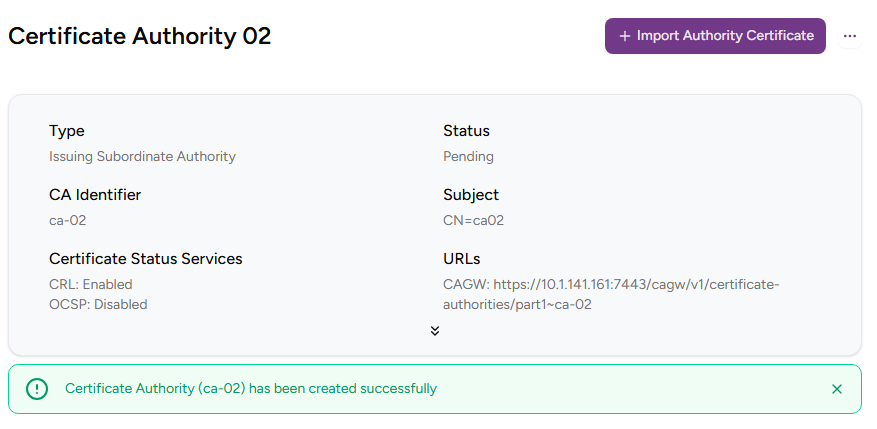
- Select a file that contains the PEM‑encoded certificate for the new CA, signed by the external CA.
- Click Import Authority Certificate.
CA Type
Click Intermediate Subordinate Authority.
Mandatory: Yes.
CA Identifier
Type a unique identifier for the new Certificate Authority within its organization. This identifier:
- Must be 3-18 characters long.
- Can only include lowercase letters, numbers, underscores ("_"), and hyphens ("-").
Do not reuse the identifier of a Certificate Authority for up to 24 hours after it has been deleted.
Mandatory: Yes.
Friendly Name
Type a friendly name for the new certificate authority in the user interface.
Mandatory: Yes.
Parent CA Identifier
Select the parent Certificate Authority.
The selector list includes only root or intermediate authorities with the basic or intermediate authority profiles.
Mandatory: Yes.
Signing Key Type
Select a combination of cryptosystem and hash algorithm for the new CA to sign certificates.
The supported keys may vary depending on the selected HSM and its configuration.
Label | Key algorithm | Signature algorithm | VA key type | VA signature algorithm |
|---|---|---|---|---|
RSA-2048+PKCS15-SHA256 | RSA2048 | sha256WithRSAEncryption | RSA2048 | sha256WithRSAEncryption |
RSA-2048+PSS-SHA256 | RSA2048 | sha256WithRSAPSS | RSA2048 | sha256WithRSAPSS |
RSA-3072+PKCS15-SHA256 | RSA3072 | sha256WithRSAEncryption | RSA2048 | sha256WithRSAEncryption |
RSA-3072+PSS-SHA256 | RSA3072 | sha256WithRSAPSS | RSA2048 | sha256WithRSAPSS |
RSA-4096+PKCS15-SHA512 | RSA4096 | sha512WithRSAEncryption | RSA2048 | sha256WithRSAEncryption |
RSA-4096+PSS-SHA512 | RSA4096 | sha512WithRSAPSS | RSA2048 | sha256WithRSAPSS |
ECDSAP256+SHA256 | ECDSAP256 | ecdsa-with-SHA256 | RSA2048 | sha256WithRSAEncryption |
ECDSAP384+SHA384 | ECDSAP384 | ecdsa-with-SHA384 | RSA2048 | sha256WithRSAEncryption |
ECDSAP521+SHA512 | ECDSAP521 | ecdsa-with-SHA512 | RSA2048 | sha256WithRSAEncryption |
ML-DSA-44 | ML-DSA-44 | ML-DSA-44 | RSA2048 | sha256WithRSAEncryption |
ML-DSA-65 | ML-DSA-65 | ML-DSA-65 | RSA2048 | sha256WithRSAEncryption |
ML-DSA-87 | ML-DSA-87 | ML-DSA-87 | RSA2048 | sha256WithRSAEncryption |
Hash-SLH-DSA-SHA2-128s-With-SHA256 | Hash-SLH-DSA-SHA2-128s-With-SHA256 | Hash-SLH-DSA-SHA2-128s-With-SHA256 | RSA2048 | sha256WithRSAEncryption |
Hash-SLH-DSA-SHA2-128f-With-SHA256 | Hash-SLH-DSA-SHA2-128f-With-SHA256 | Hash-SLH-DSA-SHA2-128f-With-SHA256 | RSA2048 | sha256WithRSAEncryption |
Hash-SLH-DSA-SHA2-192s-With-SHA512 | Hash-SLH-DSA-SHA2-192s-With-SHA512 | Hash-SLH-DSA-SHA2-192s-With-SHA512 | RSA2048 | sha256WithRSAEncryption |
Hash-SLH-DSA-SHA2-192f-With-SHA512 | Hash-SLH-DSA-SHA2-192f-With-SHA512 | Hash-SLH-DSA-SHA2-192f-With-SHA512 | RSA2048 | sha256WithRSAEncryption |
Hash-SLH-DSA-SHA2-256s-With-SHA512 | Hash-SLH-DSA-SHA2-256s-With-SHA512 | Hash-SLH-DSA-SHA2-256s-With-SHA512 | RSA2048 | sha256WithRSAEncryption |
Hash-SLH-DSA-SHA2-256f-With-SHA512 | Hash-SLH-DSA-SHA2-256f-With-SHA512 | Hash-SLH-DSA-SHA2-256f-With-SHA512 | RSA2048 | sha256WithRSAEncryption |
Hash-SLH-DSA-SHAKE-128s-With-SHAKE128 | Hash-SLH-DSA-SHAKE-128s-With-SHAKE128 | Hash-SLH-DSA-SHAKE-128s-With-SHAKE128 | RSA2048 | sha256WithRSAEncryption |
Hash-SLH-DSA-SHAKE-128f-With-SHAKE128 | Hash-SLH-DSA-SHAKE-128f-With-SHAKE128 | Hash-SLH-DSA-SHAKE-128f-With-SHAKE128 | RSA2048 | sha256WithRSAEncryption |
Hash-SLH-DSA-SHAKE-192s-With-SHAKE256 | Hash-SLH-DSA-SHAKE-192s-With-SHAKE256 | Hash-SLH-DSA-SHAKE-192s-With-SHAKE256 | RSA2048 | sha256WithRSAEncryption |
Hash-SLH-DSA-SHAKE-192f-With-SHAKE256 | Hash-SLH-DSA-SHAKE-192f-With-SHAKE256 | Hash-SLH-DSA-SHAKE-192f-With-SHAKE256 | RSA2048 | sha256WithRSAEncryption |
Hash-SLH-DSA-SHAKE-256s-With-SHAKE256 | Hash-SLH-DSA-SHAKE-256s-With-SHAKE256 | Hash-SLH-DSA-SHAKE-256s-With-SHAKE256 | RSA2048 | sha256WithRSAEncryption |
Hash-SLH-DSA-SHAKE-256f-With-SHAKE256 | Hash-SLH-DSA-SHAKE-256f-With-SHAKE256 | Hash-SLH-DSA-SHAKE-256f-With-SHAKE256 | RSA2048 | sha256WithRSAEncryption |
SPHINCS+-SHA2-128f-simple | SPHINCS+-SHA2-128f-simple | SPHINCS+-SHA2-128f-simple | RSA2048 | sha256WithRSAEncryption |
SPHINCS+-SHA2-128s-simple | SPHINCS+-SHA2-128s-simple | SPHINCS+-SHA2-128s-simple | RSA2048 | sha256WithRSAEncryption |
SPHINCS+-SHA2-192f-simple | SPHINCS+-SHA2-192f-simple | SPHINCS+-SHA2-192f-simple | RSA2048 | sha256WithRSAEncryption |
SPHINCS+-SHA2-192s-simple | SPHINCS+-SHA2-192s-simple | SPHINCS+-SHA2-192s-simple | RSA2048 | sha256WithRSAEncryption |
SPHINCS+-SHA2-256f-simple | SPHINCS+-SHA2-256f-simple | SPHINCS+-SHA2-256f-simple | RSA2048 | sha256WithRSAEncryption |
SPHINCS+-SHA2-256s-simple | SPHINCS+-SHA2-256s-simple | SPHINCS+-SHA2-256s-simple | RSA2048 | sha256WithRSAEncryption |
Falcon-512 | Falcon-512 | Falcon-512 | RSA2048 | sha256WithRSAEncryption |
Falcon-1024 | Falcon-1024 | Falcon-1024 | RSA2048 | sha256WithRSAEncryption |
NIST will deprecate some algorithms after Dec 31, 2030. See https://nvlpubs.nist.gov/nistpubs/ir/2024/NIST.IR.8547.ipd.pdf
Mandatory: Yes.
Expiration Date
Select an expiry date for the certificate signing certificate of the new CA.
After the expiry date, the CA cannot operate if the CA certificate has not been renewed.
Mandatory: No. This value defaults to the following dates.
CA Type | Default expiration date |
|---|---|
Root Certificate Authority | 20 years after the certificate is issued |
Issuing Certificate Authority | 10 years after the certificate is issued |
Certificate Profiles
Select the authority certificate profiles the new root CA will support for issuing certificates to authorities.
- Click > to expand the profiles of the selected groups.
- Select the check boxes of the profiles you want to enable.
See a complete reference of these profiles in the Entrust PKIaaS online guide.
Profiles | URL |
|---|---|
Profiles for issuing authority certificates | |
Profiles for issuing subscriber certificates |
Mandatory: Select at least one profile.
Subject
Enter a value for each RFC5280 attribute in the certificate subject’s Distinguished Name (DN).
Field | Mandatory |
|---|---|
Common Name |
|
Organization |
|
Organizational Unit |
|
State/Province |
|
Locality Name |
|
Domain Component |
|
Country |
|


Alternatively, you can:
- Toggle the Advanced Subject switch
- Type a Distinguished Name (DN) including additional attributes.
The resulting Distinguished Name will uniquely identify the certificate signing certificate of your new CA — for example:
CN=MyRootCA, O=MyOrganization, L=MyCity, ST=MyState, C=US
Mandatory: Yes.