To enable CA‑side key pair generation on EJBCA, you must create and select the following profiles.
Certificate profile for CA-side key pair generation
Create a certificate profile that enables CA-side key pair generation.
To create a certificate profile that enables CA-side key pair generation
- In the EJBCA user interface, navigate to CA Functions > Certificate Profiles.
- Create a certificate profile or clone an existing one.
- Ensure the profile meets the technical constraints of the certificate, such as algorithms or key usage.
- Set the following values.
- Type: End Entity.
- Key Usage: Digital Signature and Key Encipherment.
- Extended Key Usage: Server Authentication (for server certificates).
End entity profile for CA-side key pair generation
Create an end entity profile that enables CA-side key pair generation.
To create an end entity profile that enables CA-side key pair generation
- In the EJBCA user interface, navigate to RA Functions > End Entity Profiles.
- Create a new end entity profile or edit an existing one.
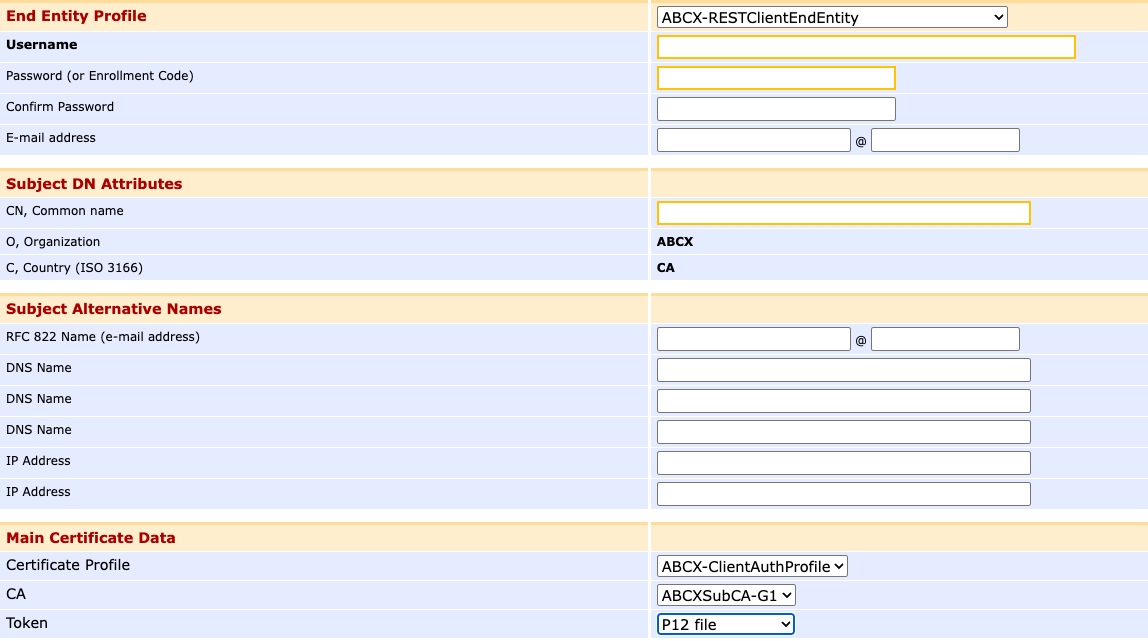
- In the Main Certificate Data section, select the following values.
- Certificate profile: select the Certificate profile for CA-side key pair generation.
- Token: select P12 file or PEM file.