See below for instructions on downloading a PKI DB Appliance data backup.
The steps below are common to both h single-node and cluster installations.
To download a PKI DB Appliance data backup
Open a web browser at the URL obtained when Running PKI DB Appliance.
Do not omit the "https" prefix of the URL.
Select Actions > Backup.
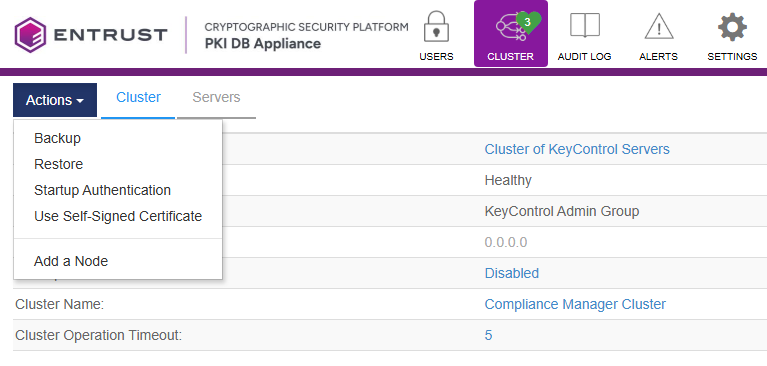
- Select the options below.
Manually triggering a backup
PKI DB Appliance automatically creates a new backup every 12 hours. Although this time frame is not configurable, you can click Perform Backup if no backup is available or you want to generate a new one.
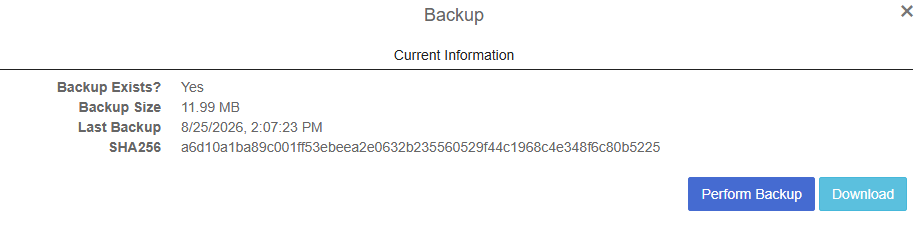
Downloading the backup file
Click Download to download the backup file. Once downloaded, run a command-line tool to generate the file SHA256 digest and compare it with the one displayed in the Backup dialog. For example, in Windows:
> Get-FileHash -Path ".\PKI_DB_Appliance_Cluster_10.5.3.0_2026_Aug_25@01-37-00_adminkey_gen1.bu" -Algorithm SHA256Algorithm Hash Path--------- ---- ----SHA256 F056058948B68D00280E23FA1A27EF40937B7BEA7A818395E2663813EB3E745E C:\Users\smithj\Downloads\PKI_DB_Appliance_Cluster_10.5.3.0_2026_Aug_25@01-37-00_adminkey_gen1.bu