See below for the known issues in the Certificate Enrollment Gateway for Cryptographic Security Platform 1.5.0.
- Unsupported ACMEv2 features (PKI-30901)
- Unsupported Intune-SCEP operations (PKI-28149, PKI-31351)
- CSRs sent from ACMEv2 clients cannot have an empty Subject DN if they will be sent to Entrust Certificate Services for processing (ECSPR-39482)
- CSRs sent from ACMEv2 clients cannot have an empty Subject DN if they will be sent to a Microsoft CA for processing (PKI-32853)
- Certificate Enrollment Gateway will log WARN messages during startup when attempting to create database tables that already existed (CEG-3392)
- 'Enable TLS' shows OFF by default (CEG-3679)
- Certificate Enrollment Gateway deployment fails after upgrade (CEG-3748)
Unsupported ACMEv2 features (PKI-30901)
The Certificate Enrollment Gateway implementation of the ACME Server does not support the following RFC 8555 features:
- EdDSA signature algorithm
- Rate limits
termsOfServiceoptional string- Changes of Terms of Service
- External Account Binding
- Pre-authorization
Unsupported Intune-SCEP operations (PKI-28149, PKI-31351)
The Certificate Enrollment Gateway integration with the Intune-SCEP protocol does not support the following draft-nourse-scep-23 operations:
- GetCRL
- GetNextCACert
CSRs sent from ACMEv2 clients cannot have an empty Subject DN if they will be sent to Entrust Certificate Services for processing (ECSPR-39482)
If an ACMEv2 client sends a CSR (certificate signing request) with an empty Subject DN, Certificate Enrollment Gateway will use the first Subject Alternative Name value in the CSR as the Subject DN. Certificate Enrollment Gateway will not alter the CSR, but will send the Subject DN value as a separate parameter to CA Gateway for processing. The cloud-based Entrust Certificate Services require that CSRs must have a Subject DN. Entrust Certificate Services will ignore the Subject DN parameter sent by Certificate Enrollment Gateway.
Workaround: You must generate the CSR externally from the ACMEv2 client using another tool, such as openssl. The ACMEv2 client can then use the externally-generated CSR.
CSRs sent from ACMEv2 clients cannot have an empty Subject DN if they will be sent to a Microsoft CA for processing (PKI-32853)
If an ACMEv2 client sends a CSR (certificate signing request) with an empty Subject DN, Certificate Enrollment Gateway will use the first Subject Alternative Name value in the CSR as the Subject DN. Certificate Enrollment Gateway will not alter the CSR, but will send the Subject DN value as a separate parameter to CA Gateway for processing. A Microsoft Certification Authority (CA) requires that CSRs must have a Subject DN. A Microsoft CA will ignore the Subject DN parameter sent by Certificate Enrollment Gateway.
This issue does not occur when using Certificate Enrollment Gateway with CA Gateway 2.5.0 or later. When using CA Gateway 2.5.0 or later, ACMEv2 clients can send a CSR with an empty Subject DN intended for a Microsoft CA without issue.
Workaround: You must generate the CSR externally from the ACMEv2 client using another tool, such as OpenSSL. The ACMEv2 client can then use the externally-generated CSR.
Certificate Enrollment Gateway will log WARN messages during startup when attempting to create database tables that already existed (CEG-3392)
During startup, Certificate Enrollment Gateway will log WARN messages when attempting to create database tables that already exist. This issue will be fixed in a future release.
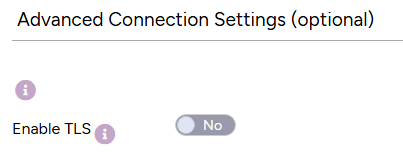
'Enable TLS' shows OFF by default (CEG-3679)
When configuring the Certificate Enrollment Gateway in the Management Console, the Enable TLS option under Advanced Connection Settings (optional) appears as OFF by default, even though TLS is enabled by default.
Certificate Enrollment Gateway deployment fails after upgrade (CEG-3748)
When upgrading Cryptographic Security Platform from 1.4.x to 1.5.0, the Certificate Enrollment Gateway (CEG) solution can fail to deploy even though the platform upgrade completes successfully. This can also occur when you upload and deploy a CEG solution file that uses the updated configuration.
The failure occurs because the CA Gateway keystore and TLS validation certificate settings in existing Certificate Enrollment Gateway configurations are not compatible with the new connection-settings configuration section. Configure these settings under the Advanced Connection Settings section.
Workaround:
- Log in to the Management Console.
- Edit the Certificate Enrollment Gateway configuration.
- In the General tab, re-upload the following files under Advanced Connection Settings:
- CAGW Keystore File
- CA Certificates File
- Submit the configuration and redeploy the Certificate Enrollment Gateway solution.
See Configuring and deploying Certificate Enrollment Gateway for instructions on configuring and deploying Certificate Enrollment Gateway using the Management Console.
