This section describes the workflow that occurs in the Cryptographic Security Platform Vault for Cloud Keys when you use BYOK for Azure.
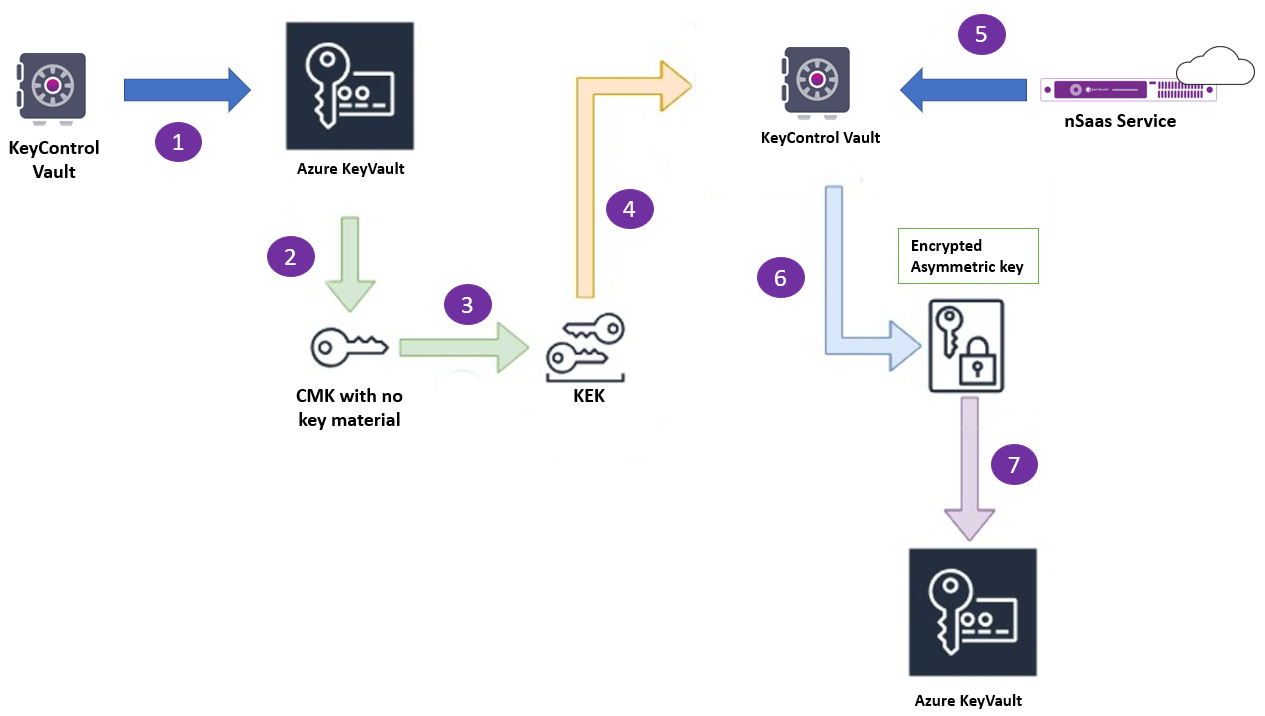
Azure keys can be hardware-protected or software-protected.
Hardware-protected key
See below for managing hardware-protected keys.
To manage hardware-protected keys
Create a Cloud Key with key material in the Cryptographic Security Platform Vault for Cloud Keys.
If you configure an HSM, the HSM generates the key and wraps it with a root key.
A Key Encryption Key (KEK) is created in Azure Key Vault in your chosen key vault.
Download the RSA-2048 wrapping public key and the KEK ID from Azure Key Vault.
Import the RSA-2048 wrapping public key and the KEK ID into the Cryptographic Security Platform Vault for Cloud Keys.
Use the imported wrapping key to wrap the asymmetric key and create a blob.
Import the asymmetric key into Azure Key Vault using the KEK ID from Step 3.
Software-protected Key
See below for managing software-protected keys.
To manage software-protected keys
Create a Cloud Key with key material in the Cryptographic Security Platform Vault for Cloud Keys.
If an HSM is configured, the HSM generates the key and wraps it with a root key, then stores it in the Cryptographic Security Platform Vault for Cloud Keys.
The asymmetric key is imported into Azure Key Vault.
SSL/TLS protects communication between Cryptographic Security Platform Vault for Cloud Keys and Azure.