Purpose | Measure the performance impact of moving the Oracle TDE master key from a local software keystore to the Entrust KeyControl keystore (CSP Database Vault) on an Oracle 19c Data Guard configuration. |
|---|---|
Audience | QA, Development, Product Management, Solution Architects, Support |
Test date | 30 Oct 2026 |
CSP version | 10.6.1 (b1061001865) |
Result | no penalty observed In this single run per condition, the Entrust Database Vault showed no throughput, latency or restart penalty compared to the software wallet. Data Guard redo transport and apply kept up with zero reported lag. |
Confidence | directional One run per condition. Results show a trend, not a statistically proven conclusion (see section 6, Limitations and caveats). |
Terminology used in this report: "HSM" is Oracle's keystore type, not a hardware HSM
Oracle TDE names its two keystore types FILE and HSM. In this report:
Oracle keystore type ( | Meaning in this test |
|---|---|
| KeyControl keystore: the TDE master key is held in the Entrust KeyControl CSP Database Vault and reached through the Entrust PKCS#11 library. No nShield, Luna or other hardware HSM was configured. |
| Software keystore: the TDE master key is held in a local wallet file ( |
1. Executive summary
Key findings
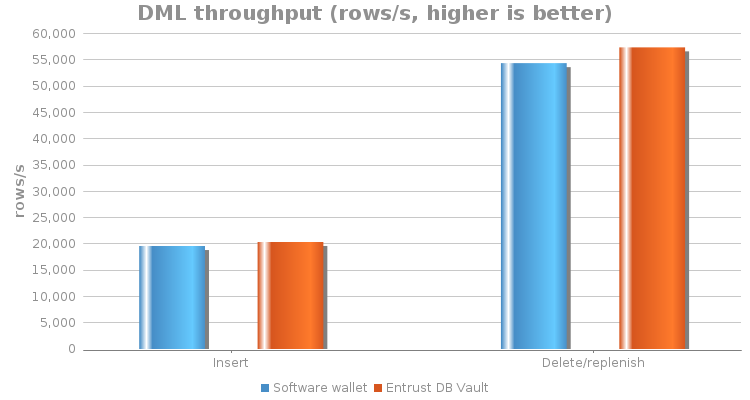
- Insert throughput: Entrust Database Vault 20,376 rows/s vs software wallet 19,600 rows/s (+3.96 %).
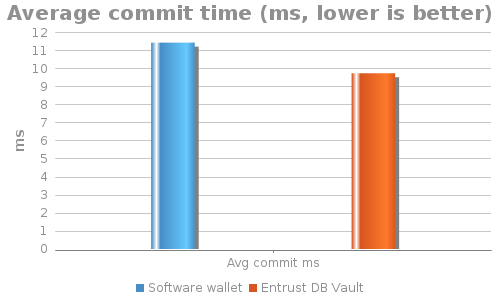
- Delete/replenish throughput: 57,396 rows/s vs 54,394 rows/s (+5.52 %), and average commit time dropped from 11.46 ms to 9.76 ms.
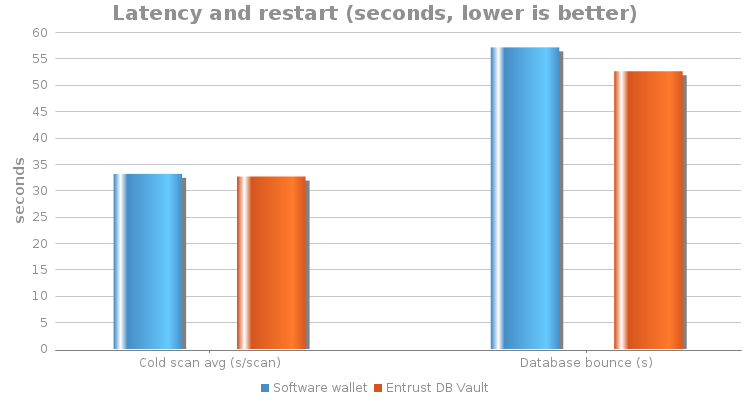
- Cold full-table scan: 32.71 s/scan vs 33.22 s/scan (1.54 % faster).
- Database bounce (shutdown + startup): 52.67 s vs 57.20 s (7.92 % faster).
- Data Guard: MRP0 stayed in
APPLYING_LOGduring every measured workload, andV$DATAGUARD_STATSreported transport and apply lag of 00:00:00 at all sampled checkpoints.
How to read these numbers
The differences are small and come from one run per condition. Run order, row counts, storage/cache state and redo history differed between runs (see section 3.5). The correct conclusion is "no measurable penalty from keeping the master key in the KeyControl keystore in these workloads", not "KeyControl is faster".
1.1 Headline results
Metric | Software wallet | Entrust Database Vault | Change (Vault vs software) | Better is | Verdict |
|---|---|---|---|---|---|
Insert throughput (rows/s) | 19,600.19 | 20,376.15 | +3.96 % | Higher | no penalty |
Delete/replenish throughput (rows/s) | 54,394.09 | 57,395.98 | +5.52 % | Higher | no penalty |
Average commit time, delete/replenish (ms) | 11.46 | 9.76 | -14.83 % | Lower | no penalty |
Cold scan average (s/scan) | 33.22 | 32.71 | -1.54 % | Lower | no penalty |
Database bounce, shutdown + startup (s) | 57.20 | 52.67 | -7.92 % | Lower | no penalty |
Data Guard transport / apply lag | 00:00:00 / 00:00:00 | 00:00:00 / 00:00:00 | No change | Lower | in sync |
2. Test environment
2.1 Architecture
+----------------------------------+ | Entrust KeyControl appliance | | CSP Database Vault (master key) | +----------------+-----------------+ | PKCS#11 over TLS (Oracle keystore type HSM) +---------------------+---------------------+ | |+--------------------v-------------+ redo +----------v-----------------------+| PRIMARY orclp | ---------------> | STANDBY orcls || Oracle 19.3.0.0.0, READ WRITE | transport (LNS) | Oracle 19.3.0.0.0 || Tablespace PERF_TDE_TS (AES-256) | | PHYSICAL STANDBY, MOUNTED || Keystore: FILE + KeyControl | | MRP0 real-time apply |+----------------------------------+ +----------------------------------+2.2 Components
Component | Value |
|---|---|
Primary database |
|
Standby database |
|
Data Guard apply | Managed Recovery Process (MRP0), real-time apply |
Encrypted object | Tablespace |
Key store under test (A) | Software keystore, auto-login (Oracle type |
Key store under test (B) | KeyControl keystore in the Entrust CSP Database Vault, with auto-login (Oracle type |
2.3 CSP appliance configuration
Item | Value |
|---|---|
CSP version | 10.6.1 (b1061001865) |
Hypervisor | VMware ESXi 8.0 |
CPU | 2 vCPU |
Memory | 8 GB |
Master key storage | KeyControl keystore in the CSP Database Vault. No external hardware HSM (nShield / Luna) attached. |
Topology | Single KeyControl appliance on the same lab network (same subnet) as both database VMs |
2.4 Oracle Data Guard VM configuration
Item | DG-Primary | DG-Standby |
|---|---|---|
Database | Oracle 19c (19.3.0.0.0) | Oracle 19c (19.3.0.0.0) |
Role | PRIMARY ( | PHYSICAL STANDBY ( |
CPU | 4 vCPU | 4 vCPU |
Memory | 16 GB | 16 GB |
Fast Recovery Area (FRA) | 40 GiB (raised from 20 GiB) | 40 GiB (raised from 20 GiB) |
Operating system | Oracle Linux 8.8, UEK 5.15.0-101.103.2.1.el8uek | Oracle Linux 8.8, UEK 5.15.0-101.103.2.1.el8uek |
Only the location of the TDE master key changes between the two test conditions. Database version, tablespace, cipher, workload SQL and Data Guard configuration stayed the same.
2.5 Software versions and patch level
Item | Value (both nodes) |
|---|---|
Oracle Database | 19c Enterprise Edition 19.3.0.0.0 |
Patch level | Database Release Update 19.3.0.0.190416 (patch 29517242) and OCW Release Update 19.3.0.0.0 (patch 29585399). Base release, no later RU applied. |
Oracle client | No separate client. Workloads ran locally with SQL*Plus 19.3.0.0.0 from the database home, connected as SYSDBA (bequeath, no Oracle Net). |
PKCS#11 library | Entrust KeyControl agent 10.6.1 (b1061001865), |
2.6 Memory, storage and redo configuration
Item | Value (both nodes) |
|---|---|
SGA |
|
Buffer cache | 3,856 MiB (dynamic, from |
Shared pool / redo buffers | 832 MiB / 8 MiB |
PGA target | 1,569 MiB |
Storage type | VMware virtual disk (120 GB, single disk), LVM volume, ext4 file system. Datafiles, online redo logs and FRA share the same file system. No ASM. |
I/O settings |
|
Online redo logs | 3 groups x 200 MiB (primary); standby redo logs 4 x 200 MiB |
3. Test approach
3.1 Scope
In scope | Out of scope |
|---|---|
TDE with software wallet vs TDE with master key in Entrust Database Vault | Unencrypted baseline (no non-TDE control run) |
DML throughput (insert, delete/replenish) on an encrypted tablespace | Isolated standby replay-only drain benchmark |
Physical I/O read path (cold full-table scan) | OS filesystem cache effects (not flushed) |
Database restart time with each wallet type | Repeated runs / statistical confidence intervals |
Data Guard transport and apply behaviour under load | RAC, multiple standbys, Active Data Guard read workloads |
3.2 Test flow
1. Build primary + physical standby (Oracle 19c Data Guard) 2. Create AES-256 tablespace PERF_TDE_TS with the software keystore (auto-login) 3. Run workload set A -> insert | delete/replenish | cold scan | bounce 4. Migrate the TDE master key to Entrust Database Vault (existing TDE scripts) 5. Configure KeyControl (HSM-type) auto-login keystore; resync the standby wallet (existing TDE scripts) 6. Run workload set B -> insert | delete/replenish | cold scan | bounce 7. Capture Data Guard state (MRP0, V$DATAGUARD_STATS) at each workload checkpoint 8. Compare results; exclude invalid runs; restore RMAN policies3.3 Detailed steps
Step 1: Setup and key migration
- The existing Oracle TDE scripts from the CSP Database Vault package were used for setup, master-key migration, auto-login configuration and the Data Guard standby wallet resync.
- After migration the primary had both the software (
FILE) and KeyControl (HSM) auto-login keystoresOPEN, so the database could open without manual wallet commands.
Step 2: Insert workload
- What: fixed 300-second loop inserting 500-row batches into a table in
PERF_TDE_TS. - Why: measures encryption cost on the write path and redo generation shipped to the standby.
- Metric: rows inserted / actual elapsed seconds.
Step 3: Delete/replenish workload
- What: fixed 300-second loop deleting 1,000 rows and inserting them again (replenish) so the table size stays stable.
- Why: mixed DML with frequent commits; it shows commit latency and redo pressure on the Data Guard transport.
- Metrics: rows processed / elapsed seconds and average commit time (ms).
Step 4: Cold scan workload
- What: Oracle buffer cache flushed before every full-table scan, then a full scan of the encrypted table, repeated over a ~300-second window.
- Why: forces physical reads and block decryption on every scan.
- Metric: average seconds per scan.
The buffer cache flush does not flush the operating-system filesystem cache. Some blocks may have been served from OS cache.
Step 5: Database bounce
- What:
encrypt.shbounce, wall-clock time for shutdown plus startup. - Why: the keystore must be opened during startup; with the KeyControl keystore this includes the PKCS#11 connection to the KeyControl appliance.
- Metric: elapsed seconds, one observation per wallet mode.
Step 6: Data Guard monitoring
At the checkpoint after each workload, these were captured on the standby:
-- Apply process state and current sequenceSELECT process, status, sequence# FROM v$managed_standby WHERE process LIKE 'MRP%';-- Reported transport and apply lagSELECT name, value FROM v$dataguard_stats WHERE name IN ('transport lag','apply lag');-- Archived logs received / appliedSELECT MAX(sequence#) received, MAX(DECODE(applied,'YES',sequence#)) applied FROM v$archived_log;3.4 Workload timing rule
Each loop is set to 300 seconds. The loop finishes the operation in progress when time runs out, so actual elapsed time is slightly longer (300.29 s to 327.61 s). All rates are calculated with the actual elapsed time, not the nominal 300 s.
3.5 Data set at the start of each run
Run | Table | Rows at start | Notes |
|---|---|---|---|
Software wallet insert |
| 1,320,500 | Rows left by an excluded first attempt that stalled when the FRA filled up. The insert table was not truncated between runs. |
KeyControl insert |
| at least 7,218,000 | 1,320,500 + 5,897,500 from the software-wallet run, plus the rows committed by the failed first KeyControl attempt (not recorded; that attempt failed with ORA-01653 at the 30 GiB datafile cap) |
Delete/replenish (both modes) | delete table | 1,000 | The script resets the table to 1,000 rows before every run |
Cold scan (both modes) | scan table | Same table, same rows for both modes | Row count was not recorded on 30 Oct |
Segment and tablespace sizes at the start of each 30 Oct run were not captured. PERF_TDE_TS started with one datafile capped at 30 GiB; a second datafile was added before the successful KeyControl insert run. The insert runs therefore did not start from the same table size; repeated runs on a reset data set are needed for a like-for-like insert comparison.
4. Results
4.1 DML throughput
4.2 Latency and restart time
4.3 Commit latency (delete/replenish)
4.4 Relative change (Entrust Database Vault vs software wallet)
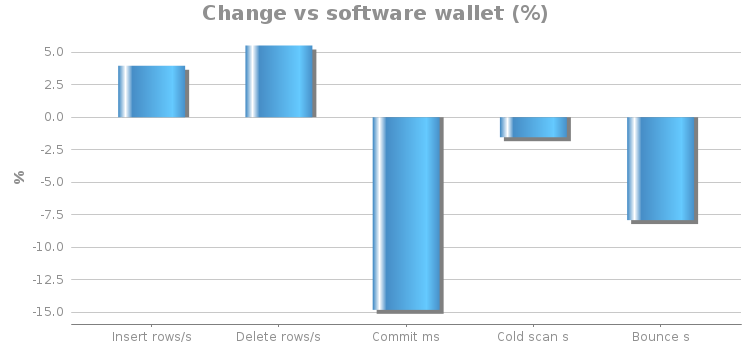
Positive is better for throughput; negative is better for time-based metrics.
4.5 Raw measurements
Wallet mode | Scenario | Elapsed (s) | Count | Measured rate | Unit | Avg commit (ms) | Validity |
|---|---|---|---|---|---|---|---|
Software wallet (auto-login) | Insert | 300.89 | 5,897,500 rows | 19,600.19 | rows/s | valid | |
Software wallet (auto-login) | Delete/replenish | 300.29 | 16,334,000 rows | 54,394.09 | rows/s | 11.46 | valid |
Software wallet (auto-login) | Cold scan | 309.00 | 9 scans | 33.22 | s/scan | valid | |
Entrust KeyControl (auto-login) | Insert | 304.13 | 6,197,000 rows | 20,376.15 | rows/s | valid | |
Entrust KeyControl (auto-login) | Delete/replenish | 301.38 | 17,298,000 rows | 57,395.98 | rows/s | 9.76 | valid |
Entrust KeyControl (auto-login) | Cold scan | 327.61 | 10 scans | 32.71 | s/scan | valid |
Wallet mode | Database bounce (shutdown + startup) |
|---|---|
Software wallet (auto-login) | 57.20 s |
Entrust KeyControl (auto-login) | 52.67 s |
4.6 Visual summary
Performance index (software wallet = 100, higher is better)
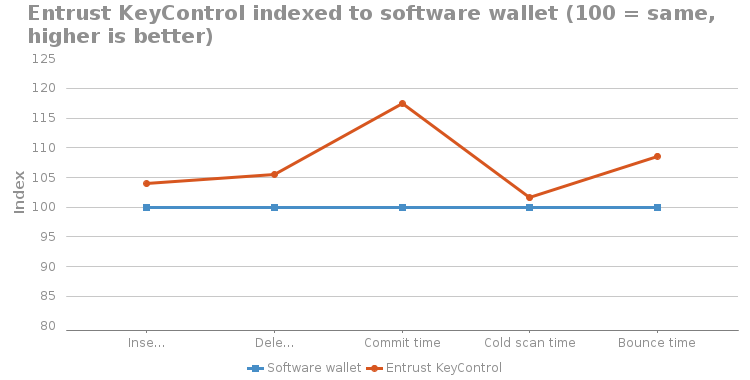
Throughput: KeyControl / software wallet x 100. Time metrics: software wallet / KeyControl x 100, so a shorter time also scores above 100.
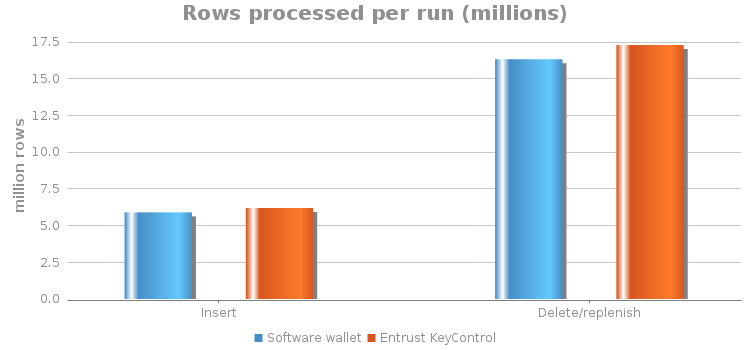
Rows processed per 5-minute run
5. Data Guard behaviour
MRP0 was APPLYING_LOG during every measured workload, and V$DATAGUARD_STATS reported 0 transport lag and 0 apply lag at all sampled checkpoints with both wallet types. The standby kept up with the primary's redo rate when the master key was held in the Entrust Database Vault.
Workload | Wallet mode | MRP state | Sequence markers at checkpoint | Transport lag | Apply lag | Interpretation |
|---|---|---|---|---|---|---|
Insert | Software wallet | MRP0 APPLYING_LOG | Sequence 167; received/applied archive sequence 166 | 00:00:00 | 00:00:00 | Concurrent apply; no separate catch-up timer recorded |
Delete/replenish | Software wallet | MRP0 APPLYING_LOG | MRP0 applying current redo at post-run checkpoint | 00:00:00 | 00:00:00 | Concurrent apply; no separate catch-up timer recorded |
Insert | Entrust KeyControl | MRP0 APPLYING_LOG | MRP0 sequence 308; archived received 307, applied metadata 291 | 00:00:00 | 00:00:00 | Real-time apply active; archived metadata can trail current redo |
Delete/replenish | Entrust KeyControl | MRP0 APPLYING_LOG | MRP0 sequence 362; archived received 361, applied metadata 343; RMAN later confirmed through 361 applied | 00:00:00 | 00:00:00 | Real-time apply active; no isolated replay-throughput rate recorded |
6. Limitations and caveats
Read before using these results externally
- One run per condition. No repeatability data or confidence interval is available.
- No unencrypted baseline. The comparison is software wallet vs Entrust Database Vault, both with TDE. Absolute TDE overhead was not measured.
- Unequal conditions. The insert runs started from different table sizes (1.32 M vs at least 7.2 M rows, section 3.5), and elapsed windows, run order, storage/cache state and redo history differed between the two runs.
- Small, shared storage. Datafiles, redo logs and FRA share one VMware virtual disk with 3 x 200 MiB redo logs and one database writer (section 2.6), so write throughput is limited by this lab configuration.
- OS cache not flushed before cold scans.
- Bounce time is a single observation per wallet mode.
- Data Guard: lag was sampled at checkpoints; a replay-only drain-time test was not run.
7. Conclusion
In this test on Oracle 19c Data Guard with an AES-256 encrypted tablespace, keeping the TDE master key in the Entrust Database Vault showed no measurable performance penalty compared to a local software keystore:
- Insert and delete/replenish throughput were within about +4 % to +6 %.
- Cold-scan time and database restart time were not longer.
- The physical standby applied redo in real time with zero reported transport and apply lag.
This matches how Oracle TDE uses the master key: it is needed to open the keystore and to unwrap the tablespace keys, which are then cached in memory. Day-to-day block encryption and decryption do not call KeyControl.
8. Final state of the environment
Node | State |
|---|---|
Primary ( | READ WRITE; KeyControl ( |
Standby ( | PHYSICAL STANDBY, MOUNTED; software ( |
RMAN | Archivelog deletion policies restored to |
FRA | 40 GiB on both nodes |
9. Appendix
9.1 Glossary
Term | Meaning |
|---|---|
TDE | Transparent Data Encryption: Oracle encrypts data files on disk; applications see plain text |
Master key | Key that wraps the tablespace keys; kept in the wallet / keystore |
Software wallet / keystore | Oracle keystore type |
KeyControl keystore | Oracle keystore type |
Entrust Database Vault | CSP / KeyControl vault that holds the TDE master key for the KeyControl keystore |
MRP0 | Managed Recovery Process that applies redo on the physical standby |
Transport lag / Apply lag | How far the standby is behind the primary in receiving / applying redo |
FRA | Fast Recovery Area: disk area for archived logs and backups |
Cold scan | Full-table scan after flushing the Oracle buffer cache, so blocks are read and decrypted from disk |
9.2 Source data
- Workbook:
Oracle_TDE_Performance_DataGuard_2026-10-30.xlsx(sheets: Summary, Measurements, Data Guard, Run Notes). Attach it to this page. - Result logs: listed in section 4.5, Raw measurements.